
Everything You Need to Know to Skip the ID Check on Your Next Flight with TSA PreCheck Faceless ID
Information about TSA PreCheck Faceless ID
2/27/20262 min read
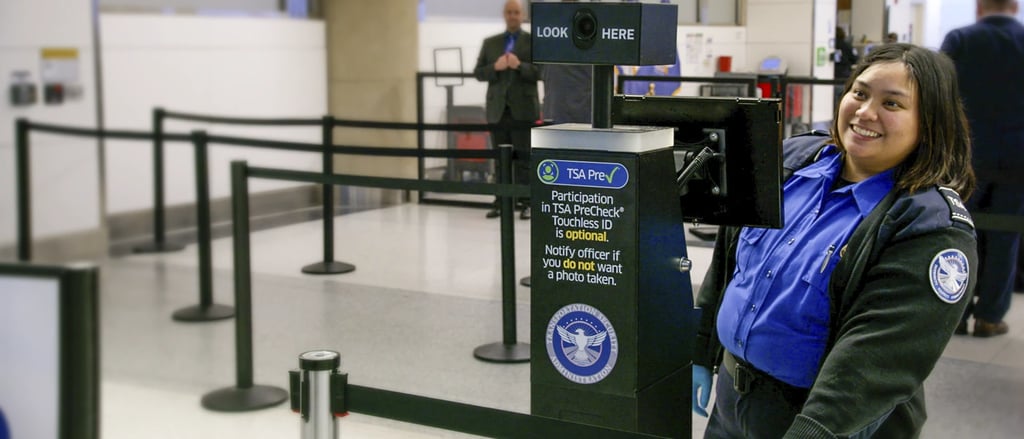
Let’s be honest: fumbling for your wallet or phone at the security checkpoint is the most stressful part of the airport experience. You’re juggling bags, coffee, and kids, all while trying to prove you are who you say you are. But what if you could just… walk through?
As of February 2026, the TSA PreCheck Touchless ID (facial recognition) program is active at approximately 40+ U.S. airports. This technology is expanding rapidly and is expected to be available at 65 major airports by Spring 2026, allowing eligible travelers to use a face scan instead of showing a physical ID.
What exactly is "Touchless ID"?
It is a voluntary, biometric identity verification system. Instead of an officer manually comparing your face to a physical ID card, a high-speed camera captures a "live template" of your face.
The system instantly matches that live scan to the passport photo already on file with the U.S. government.
Speed: Verification takes about 5–10 seconds.
Seamless: No physical ID or boarding pass is required at the podium.
Accuracy: It reduces human error and speeds up the entire PreCheck lane.
Are You Eligible? (The "Trifecta" Rule)
To use the Touchless lane, you must meet these three requirements:
Active TSA PreCheck: You must have a Known Traveler Number (KTN).
Valid U.S. Passport: Your passport photo is the "master key" for the facial scan.
Participating Airline: You must be flying with one of the five major partners: Delta, United, American, Southwest, or Alaska.
How to Enroll (Do This BEFORE You Leave for the Airport)
Enrollment doesn't happen at the airport; it happens in your airline's app. Follow these steps for the "Big Five" airlines.
The Step-by-Step Setup:
Airline Action in the App
Delta Profile > Account > TSA PreCheck Touchless ID (Toggle ON).
United Account > TSA PreCheck & Travel Docs > Opt-In.
American AAdvantage Profile > Information and Password > Opt-In.
Southwest My Account > Quick Links > TSA PreCheck Touchless ID.
Alaska Mileage Plan Profile > Ensure KTN/Passport are saved > Check "Opt-In".
At the Airport: What to Expect
Once you check in on your app, look for a green "Touchless" icon next to the TSA PreCheck logo on your digital boarding pass.
Find the Lane: Follow signs for "TSA PreCheck Touchless ID."
Step Up: Stand on the designated floor marker and look into the camera.
The Green Light: Once the screen shows a green checkmark, the officer will wave you through.
The "Golden Rule" of Touchless ID
Even though it’s called "Touchless," you must still carry your physical ID. TSA regulations still require a backup in case the technology is down or further verification is needed.
Privacy: Is My Data Safe?
TSA has issued strict guidelines for the 2026 rollout to address privacy concerns:
Deletion: All facial templates are encrypted and deleted within 24 hours of your flight.
No Surveillance: The data is used only for identity verification at the checkpoint, not for law enforcement or general surveillance.
It’s Optional: You can always choose to use the standard PreCheck lane and show a physical ID.
Is Your Airport Ready?
As of February 2026, these are some of the major hubs currently supporting Touchless ID for participating airlines:
East Coast: JFK, LGA, EWR, BOS, PHL, DCA, IAD, ATL, MIA, FLL.
Central: ORD, DFW, DAL, IAH, HOU, DEN, MSP, DTW, MCI.
West Coast: LAX, SFO, SJC, SEA, PDX, PHX, SLC, LAS, SNA.
Source: Transportation Security Administration (TSA)